Before we started
Pop Punch is a casual game about tapping away office stress on cartoon characters. You tap an office worker, the boss, a goblin or a zombie, and bandages and stars fly; a challenge mode lets you race for a score in runs from 10 seconds to 3 minutes. The app ships in 10 languages, is supported by ads, and keeps rankings and achievements in Game Center.
Over a few weeks the code and the store listing had come together. What was left was a last check and the review request, and the job I gave the agent that day was one line:
“Let’s do a final check of Pop Punch in App Store Connect and request review.”
The agent was Claude Code, running in its desktop app. It had fastlane for building and uploading, an App Store Connect API key, and a browser inside the app. The short version: by the afternoon the app was submitted. But a lot got caught along the way in what I had pictured as “check, then click”.
1. Read the state first
Before opening a single web page, the agent read everything through the API: app info and per-language names and subtitles, the version, the attached build, the review notes, the screenshots for every language, the countries on sale and the Game Center items. It laid all of that next to the source documents in the repository and compared them.
The first catch was the build. The version waiting for review had build 10 attached, uploaded six days earlier (October 17), and 27 more app-code commits had landed since. The new layout for the folding iPhone Duo, the rating prompt, drag punches and the new privacy policy address were all missing from build 10. The iPhone Duo screenshots we had already uploaded showed a screen that build 10 doesn’t have. Submitted as it was, it could have come back with “the screenshots don’t match the app”.
The agent asked whether to submit build 10 or build fresh from the latest main. I told it to pull the latest code and build again. fastlane made a Release build and uploaded it, and build 11 finished processing that afternoon.
Human call — Upload build 11 from the latest main and submit that build.
2. One line of copy didn’t match the app
Next up was the copy. The description in 11 store languages and the review notes said “10 challenge tickets a day”. Remote configuration (Firebase Remote Config) had been lowered to 5 that same day. Build 10 reads the remote value too, so a reviewer opening the app would see 5. The description and the app were telling two different stories.
The agent confirmed that the source text in the repository (Localization/*.json) already said 5, and used the API to update the description in all 11 languages and the review notes to match. That number later left the description altogether: the review step pointed out that a remote value can change at any time, while the description can only change with a new version. Put a number there and it drifts again the moment the remote value moves.
The same pass found mainland China switched on among the countries on sale. In mainland China even a game you don’t charge for needs a publishing license (an ISBN), so the launch guide said to leave it out, but the setting had never been changed.
Human call — Match the copy to the source text, keep changeable numbers out of the description, and leave out mainland China.
3. Things only the web page shows
What the API doesn’t expose, the agent checked in the browser, reading the App Store Connect pages I had signed in to.
- The App Privacy answers were not published. Without them you can’t submit.
- The app distribution agreement, the EU Digital Services Act and the Korean e-commerce items were all active.
- All 24 Game Center items (leaderboards, achievements, challenges, activities) said “Prepare for Submission”. They have to go into review together with the app version.
When the agent went to click “Publish” on App Privacy, Claude Code’s automatic permission check stopped the click, because it changes something the public sees. The agent didn’t look for a way around it. It stopped and asked me to press it or allow it. The button was pressed only later, after I had asked again for the submission.
Human call — Buttons that publish something get pressed only after a person has said so.
4. Five reviewers at once
Right before submitting I asked for one more thing: look at the listing the way a growth marketer would, check that each language reads naturally, that the keywords are well chosen, and that the screenshots (iPhone Duo included) went up properly.
The agent split this across five sub-agents: one for marketing and App Store optimization, one for the Asian languages (Japanese, Simplified and Traditional Chinese), one for the European languages (Spanish, German, French, Portuguese, Italian), and two for the screenshots, splitting the 110 images actually uploaded between them. All five ran at the same time, and the reports came back a few minutes later.
These were the findings that mattered:
- The description promised more than the app does. It said photos, names and lines are “kept out of backups”. In the code only the photo file carries the do-not-back-up flag, and the privacy policy says the same thing: only photos are excluded. A reviewer reading the two side by side would catch it.
- Screenshot caption 4. The English caption read “Pick a target, even a photo”. Next to a feature that lets you add a photo of a real person, it can read as “pick anyone and hit them” — the kind of thing App Review guideline 1.1.1, on defamatory and mean-spirited content, is about. The German, Spanish and Chinese captions had the same problem.
- One Japanese word. The word used for vibration, 「バイブ」, can be read in a very different way. It became 「振動」.
- Mexican Spanish keywords. They were a copy of the Spain Spanish ones. The US storefront indexes US English and Mexican Spanish keywords together, so those 100 characters were going to waste.
- Primary language. It was Korean, so countries without a localization of their own, such as the UK or much of Southeast Asia, would see the Korean page. It is English now.
I didn’t take the reports at face value. The agent opened the code to check the backup claim, and opened the images to check two other findings: a French button label that was cut off, and characters that looked cropped on the iPhone Duo. Both were real.
I picked which findings to act on. Anything that needs new screenshots — a scene with speech bubbles, a folded iPhone Duo — and localizing the English labels inside the app went to the next version. Names, subtitles, keywords and descriptions, on the other hand, can only change with a new version once the app is out, so those got fixed now.
Human call — Fix the two must-fixes (the backup claim, caption 4) plus the recommended copy, keywords and primary language; anything that needs new screenshots waits for the next version.
5. Changing a caption without the originals
Changing caption 4 meant regenerating the screenshots, because the caption is drawn into the image. But the original 6.9-inch captures were gone. All that was left were the finished images we had uploaded.
The agent took another route. With the script that builds the screenshots, it redrew only the top background and the text for the new caption, and joined that onto the bottom (the app screen) of the existing image. The background gradient depends only on position, so the seam shouldn’t show. That still had to be proven:
- First it checked that the images in the working folder were byte-for-byte the ones in App Store Connect.
- It redrew the top of screenshot 1 the same way and compared it with the original pixel by pixel, which confirmed the text size hadn’t changed.
- It also compared the rows just below the seam with the original.
There were two traps. The script sizes the text on every image of a language to fit that language’s “longest caption line”, so in Italian and Portuguese the new caption’s length changed the text size for the whole language. Only screenshot 4 would have come out bigger or smaller, so those captions were reworded to keep the length. And the agent forgot to change the English caption: “Pick a target” was still there on the contact sheet that put all 9 languages on one page, which is how it was caught.
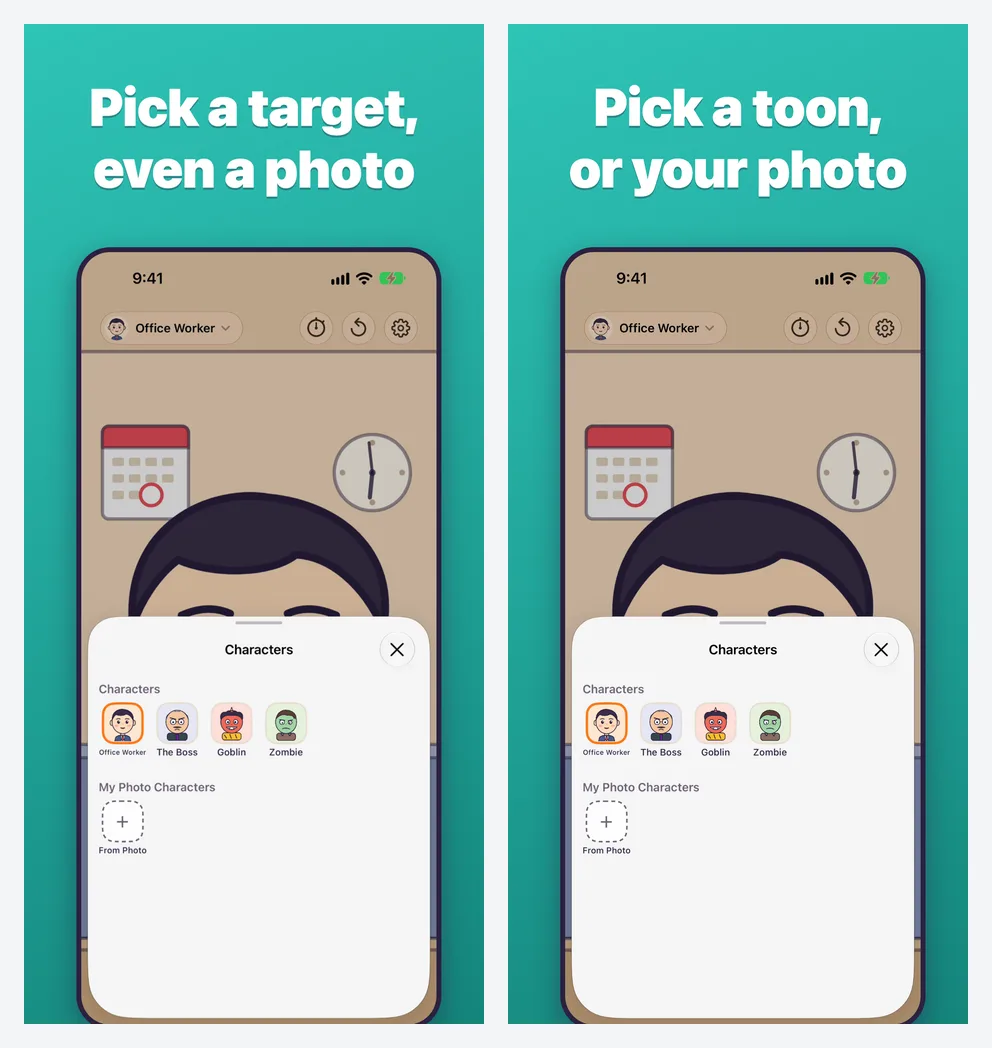
Human call — The new caption says “pick a character or your own photo”, not “pick a target”. The Korean caption stays as it is.
6. A recording must never show the face
Before the final check I asked for a look at the app as well, and there was one thing I wanted nailed down: if someone adds a photo and records the screen, that face must not appear.
Pop Punch draws photos inside the canvas iOS uses for secure text fields — the same reason a password field shows up blank in screenshots and recordings. The agent found every place in the code where a photo reaches the screen: the game screen, the character button at the top, the character sheet and the naming screen. All four were inside that canvas. The shareable result image never contains a photo to begin with.
That canvas depends on how iOS is built inside, so an OS update could take it away. For that case, the app turns photo mode off when it can’t find the canvas. The development switch that turns protection off is not in Release builds.
private var photoModeAvailable: Bool {
    #if DEBUG
    if UserDefaults.standard.bool(forKey: "disableSecure") { return true }
    #endif
    return container.canSecure
}
The agent also opened the executable of the build 11 we had actually uploaded. That switch’s name, debug log strings and test ad IDs: none of them were there. The last check was still mine. On build 11 from TestFlight I recorded the screen and took screenshots myself, and the face didn’t show.
Human call — Recording protection isn’t signed off by reading code; it’s confirmed by recording on a real device.
7. “Build 11 has a debug window, doesn’t it?”
During that device check I noticed an unfamiliar box on screen: a black panel with FPS, GPU time, memory and a frame graph.
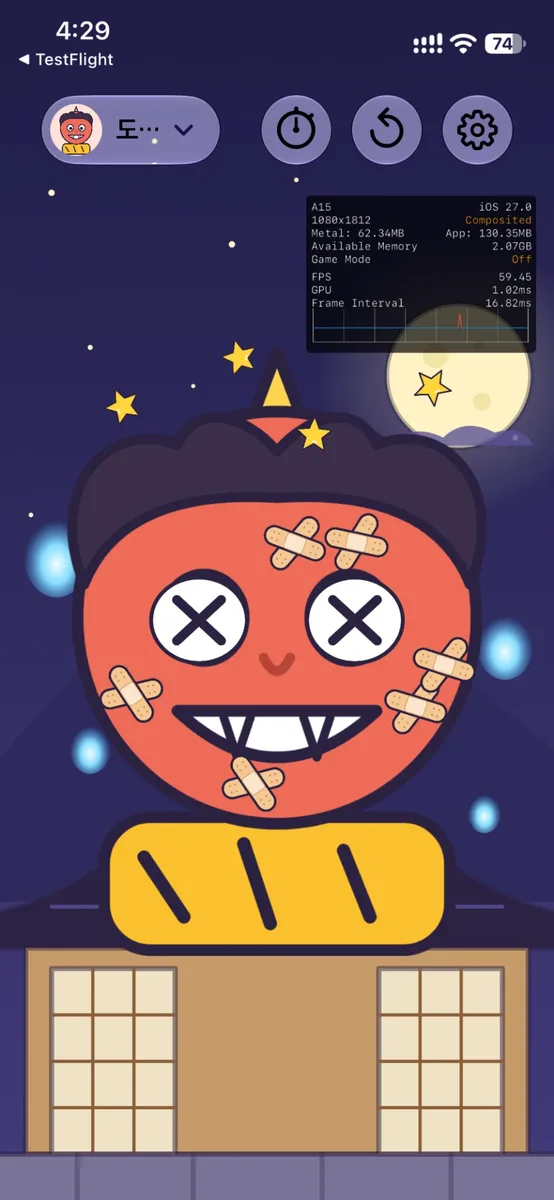
A debug window in the build going to review? I asked whether we had to upload a new one. The agent unpacked the uploaded IPA and went through it:
- Every key in the settings file (Info.plist). Nothing that turns this panel on.
- The app executable and every bundled library, searched for related strings. Zero hits.
- The signing entitlements: still the App Store distribution ones, with debugging turned off.
The panel was Metal HUD, Apple’s performance overlay. Turned on in the device’s developer settings, it sits on top of every app that draws with Metal. The culprit was a developer setting I had switched on on my own iPhone. No new build was needed.
Looking back, it was a fair suspicion for both of us to start with “the app is broken”. It ended quickly because the agent didn’t wave it off as “probably a device setting” — it opened the actual binary and showed why.
Human call — Submit build 11 as it is, no new build.
8. Submitting
What remained was putting the Game Center items into the submission. On the web that means opening each item and clicking “Add for Review” — 24 times. The agent added one through the page, checked how that item showed up through the API, and then added the other 23 through the API: 8 leaderboards, 8 achievements, 4 challenges and 4 activities, plus app version 1.0, for 25 items in all.
The final “Submit for Review” was pressed after I said to go ahead. The page showed that 25 items had been submitted, and the version status changed to “Waiting for Review”. It is set to go live as soon as it is approved.
Human call — Submit the 24 Game Center items together with the app, and release automatically once approved.
Looking back
The day split up quite cleanly. What the agent did well was looking at everything and the tedious checking: comparing the description in 11 languages with the source word for word, opening 110 screenshots, digging through binary strings, comparing pixels. A person, tired, would have skimmed most of it.
Which findings to take and which to defer, when to press a publish button, what to check one last time on a real device: choosing what to choose was my job. And at those points the agent stopped and asked.
Next time I want the store description and the app’s behaviour to come from the same source, and to keep values that change, like numbers, out of the description. I’ll also keep the original screenshot captures instead of deleting them. Stitching images together to fix one caption is something you only want to do once.
I’ll add the review result below when it comes in.